
The Problem Nobody Talks About Honestly
Picture this: you spend three hours crafting your resume. You choose every word carefully, format it beautifully… and then send it off for your dream job. Silence. No rejection email, not even a real “we received your application.” Just nothing.
Here’s the uncomfortable truth: the problem usually isn’t your experience or your qualifications. It’s that no human ever laid eyes on your resume in the first place.
Today, over 95% of large companies — and a growing share of mid-sized ones too — rely on Applicant Tracking Systems (ATS) to automatically screen thousands of resumes before a single one reaches a recruiter’s desk. These systems don’t “read” your resume the way a person does. They parse it, pull out structured data, compare that data against the job’s criteria, and then rank you — or filter you out entirely — without any human ever opening the file.
This guide walks you through exactly how to write a resume that passes ATS systems, step by step — not vague tips, but the actual mechanics. This isn’t another generic listicle recycled from a Google search. It’s a practical, technical breakdown of how these systems actually work, and how to build a resume that outsmarts them without losing what makes it genuinely compelling to the human who eventually reads it.
First: Understand What You’re Actually Up Against
Before you write a single word, you need to understand that an ATS processes your resume in three distinct stages — and each one follows its own logic, often completely different from how a human would read the same document.
Stage One: Parsing
The system breaks your file down into raw text, then tries to sort each piece into predefined fields — name, email, job titles, employment dates, skills, education. Think of it like a machine trying to fill out a form based purely on where things sit on the page, not on what they actually mean.
Here’s the catch: this sorting depends on the text’s structure, not its meaning. A table, a side column, an icon, or an elaborate design can throw off the system’s reading order entirely — suddenly your phone number lands in the job-title field, or an entire section gets skipped because the software never recognized its heading.
Stage Two: Matching
Once parsed, the system compares the keywords pulled from your resume against keywords extracted from the job posting itself — often using something like TF-IDF or simpler semantic matching, and increasingly, more sophisticated language models. Every match earns you points. But the system has no concept of “you’re clearly a strong team leader” unless you’ve actually written something close to “team leadership” in a phrasing similar to the posting.
This single detail is why so many genuinely qualified people get filtered out — not because they lack the experience, but because their wording didn’t happen to mirror the job ad’s, even though the substance matched perfectly.
Stage Three: Ranking
Every candidate gets a match score, and the pool gets ranked from highest to lowest. At many companies, the recruiter only ever looks at the top 5-10%. Everyone else sits archived, unopened, sometimes for years.
Bottom line: you’re not primarily writing a resume to convince a human. You’re designing a piece of structured data that needs to glide cleanly through a machine first — and only then does it get the chance to convince a person. This isn’t a minor detail; it’s the entire strategy.
Second: Formatting — The Real Secret to Writing a Resume That Passes ATS
This is the most common misconception out there: people assume “ATS-friendly” means a dull, personality-free resume. Not true. The real rule is: keep the structure simple, not the content. You can absolutely write rich, distinctive, persuasive content — just within a technically simple layout that any system, even an outdated one, can read.
What to Avoid Completely
Tables. Plenty of older and mid-tier ATS platforms read tables in a scrambled column order, mixing up cells from unrelated columns.
Two-column layouts. Visually popular — and everywhere in free templates online — but technically disastrous. Some systems read top-to-bottom on the left side first, then jump to the right, merging a sentence from your skills column with one from your experience column into pure nonsense.
Icons or graphics used to convey information. A phone icon instead of the word “phone,” a circular meter showing language proficiency — none of this is machine-readable. The system just sees a blank image.
Headers and footers. Some systems ignore these zones entirely during parsing. Never put your core contact information there, no matter how clean it looks visually.

What to Use Instead
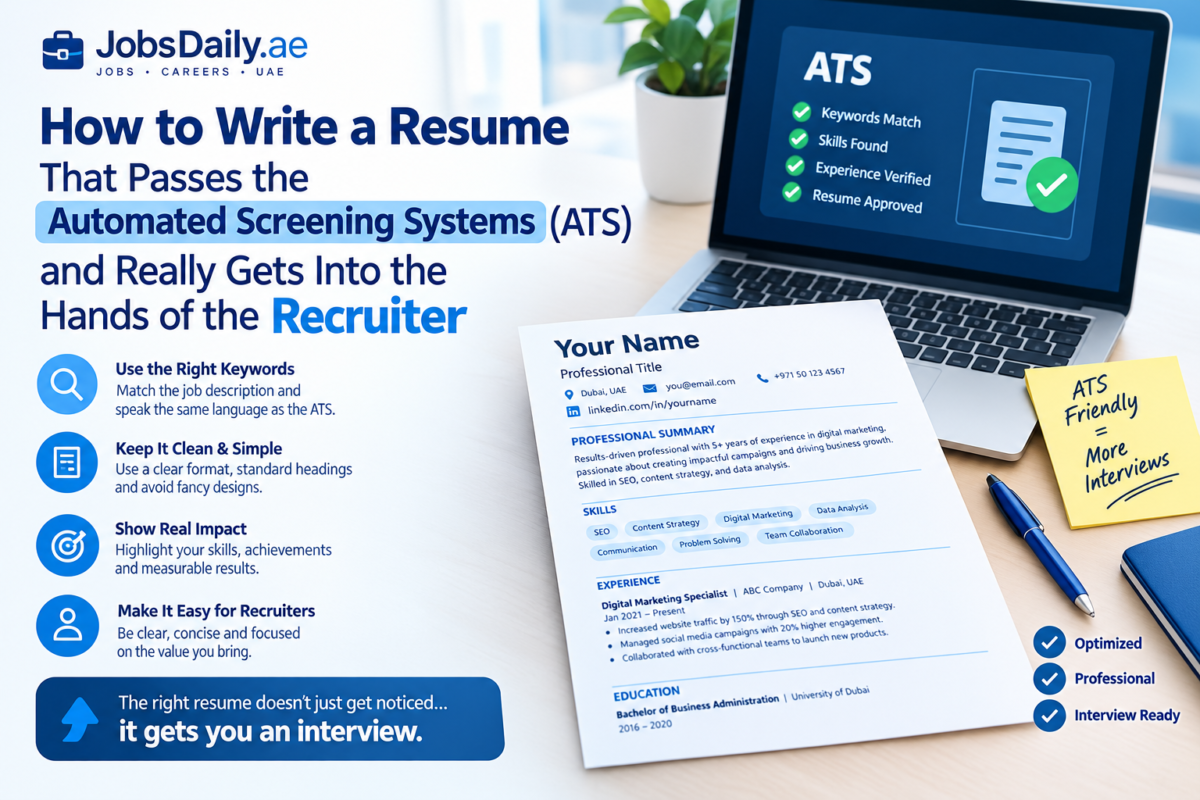
- A single column, top to bottom, in logical order: contact info → professional summary → experience → skills → education.
- Clear, conventional section headings — “Work Experience,” not “My Journey.” “Skills,” not “What I Bring to the Table.” These systems are trained to recognize standard terms; creative labeling costs you points instead of earning them.
- Word (.docx) as your first choice, or a text-based PDF — never a scanned image. Always export your PDF from an actual word processor, and make sure the text inside is selectable and copyable. If you can’t highlight it with your mouse, the machine can’t read it either.
- Simple bullets (•) or dashes (-) only — skip decorative symbols and emojis entirely.
A Quick, Effective Test
Open your resume, select everything with Ctrl+A, copy it, and paste it into a bare-bones text editor like Notepad. If the text comes out in a clear, logical order — matching the sequence you actually wrote it in — you’ve passed the most important test there is. If it comes out jumbled, merged randomly, or missing whole sections, your resume is in real trouble, and it’s time to rebuild the layout with something simpler.
Third: Keyword Strategy — The Core Skill Behind Writing a Resume That Passes ATS
This is where the real skill lies — and also where the most common mistake happens.
How to Pull the Right Keywords
Don’t guess. Go straight to the job posting and extract:
- The exact job titles as written (“Digital Marketing Specialist,” not just “Marketer”)
- Specific tools and software named explicitly (Excel, Salesforce, Python, SAP…)
- Recurring verbs and skills throughout the description (manage, analyze, develop, coordinate…)
- Required or preferred certifications and qualifications
- Any specialized industry terms, even ones that seem obvious to you
Build a list from these, then make sure each one appears — either exactly or in very close wording — somewhere in your resume, at least once, woven naturally into context. Not dumped into a separate keyword list at the bottom of the page.
The Fatal Mistake: Keyword Stuffing
Some candidates try adding a paragraph in white text on a white background, or in tiny font, crammed with every conceivable keyword, hoping to trick the system. This backfires for two reasons.
Modern systems — especially ones built on language models — are increasingly good at detecting exactly this kind of manipulation, and treat it as a red flag that lowers your ranking rather than boosting it. And even if it slips past the machine, a human will eventually open the file, accidentally select the hidden text, and your credibility takes a hit that can be hard to recover from with that company.
The Smarter Alternative
Use the keyword inside a real accomplishment. Instead of writing “Skills: Project Management,” write in your experience section: “Led a team of 6 through a 4-month product development project, following Agile methodology.” Same keyword, but now it convinces both the machine and the human reading it — instead of serving one at the expense of the other.
Semantic Matching
Newer systems are getting better at recognizing close synonyms — “data analysis” and “Data Analysis,” for instance. But don’t bank on it, since plenty of companies still run older, simpler systems. If a term appears in English in the job posting, keep it in English in your resume too, even if the rest is in Arabic — especially for tool names, software, and certifications. Don’t translate “Google Analytics,” for example; doing so can make the system fail to recognize the term altogether.
Fourth: The Ideal Content Structure, Section by Section
1. Header
Full name, phone number, email, city — no need for a full street address, for privacy reasons — and your LinkedIn link if you have one. Write this as plain text at the top of the page, not inside a designed header element, since some systems skip that zone entirely, as mentioned earlier.
2. Professional Summary — Not “Career Objective”
This section is often neglected or filled with hollow phrases like “seeking an opportunity to grow in a competitive environment.” That sentence carries zero useful keywords and adds no real value to anyone reading it.
Instead, write 3-4 lines summarizing who you are professionally, your core area of expertise, and your most measurable achievement. This section matters a lot, since some systems weight words appearing in the first 30% of the document more heavily — much like a human eye that forms a first impression within seconds.
3. Work Experience — Framed as Achievement, Not Job Description
The common mistake: listing duties as if copying from the original HR job posting — “Responsible for account management,” “Handled client relations.” This does nothing to distinguish you from any other candidate with the same title, and gives no real proof of your actual capability.
The stronger formula — sometimes called Verb + Task + Measurable Result:
“Developed a content marketing strategy that increased organic site traffic by 40% over six months.”
Start each bullet with a strong verb (developed, led, improved, launched, reduced, increased), and attach a number wherever possible — numbers read as a strong signal of achievement to the machine, and convince a human reader in seconds during a quick skim.
4. Skills — A Clear, Separate Section
Even if you’ve already mentioned a skill inside an achievement, repeat it in a standalone “Skills” section so the system can pick it up easily. Split it into hard skills and soft skills if it fits naturally — but skip tables. A simple bulleted list is enough, and far safer.
5. Education and Certifications
Write the certification’s full name, the institution or issuing body, and the year. If the role requires a specific professional certification like PMP or CPA, include both the full name and the abbreviation, since some systems only search for one or the other.
Fifth: The Strategic Mistake Most Job Seekers Make
Using one single resume for every application. This directly kills your chances, because every ATS compares your resume against that specific job posting — not against some general standard. A resume scoring 85% for “Digital Marketing Specialist” might barely hit 40% for “Marketing Manager,” even if your actual experience qualifies you for both roles equally well.
The practical fix: keep one comprehensive “master” resume containing every experience and achievement you have, in full detail. Then, before each application, spend just 10-15 minutes adjusting the summary and re-weighting the keywords to match that specific posting. That small investment of time makes a significant difference in how often you clear the automated screen — and it’s often the real difference between someone who lands interviews consistently and someone who sends out dozens of applications and hears nothing back.
Sixth: After Beating the Machine — Don’t Forget the Human
At the end of the day, learning how to write a resume that passes ATS is only half the job — the other half is making sure a human still wants to read it. Even the most technically “ATS-optimized” resume will fail if a human reads it and finds it dry or unconvincing. The goal was never to satisfy the algorithm at the expense of clarity and honesty — it’s to build a document that serves both: a clean structure the machine can parse, and real, grounded content that a person finds genuinely convincing.
Your resume isn’t a list of things you’ve done. It’s a persuasive case for the value you’ll bring to what comes next. Make every line answer the one silent question in the reader’s mind: why you, specifically?
Frequently Asked Questions About ATS Resumes
What is an ATS, and why do companies use it?
An Applicant Tracking System (ATS) is software that employers use to collect, organize, and filter job applications. When hundreds or thousands of people apply for one role, recruiters can’t read every resume manually. The ATS parses each file, extracts details like your job titles, skills, and dates, and compares them against the job requirements. Recruiters then review the highest-ranked candidates first, which is why a resume that the system can’t read properly may never be seen by a person.
Does every company really use an ATS?
Most large companies do, and many mid-sized and smaller businesses now use one too, often through affordable platforms built into job boards. Smaller employers may still review resumes by hand. Since you rarely know which type of employer you’re applying to, it’s safest to write every resume as if an ATS will read it first.
What is the best file format for an ATS resume: PDF or Word?
A .docx file is the safest choice, because almost every ATS can read it accurately. Modern systems can usually handle a simple, text-based PDF as well, but PDFs created from design tools or saved as images can fail to parse. If the job posting specifies a format, follow it. If it doesn’t, use .docx, or a clean text-based PDF where you can select and copy the text.
Can an ATS read tables, columns, icons, and graphics?
Often it can’t, or it reads them in the wrong order. Multi-column layouts, tables, text boxes, skill bars, and icons can scramble your content, so your work history might end up mixed with your skills. Headers and footers are also risky, since some systems ignore them entirely, so don’t put your name or contact details there. A single-column layout with standard headings is the most reliable.
Helpful Resources
If you’d like extra support with your job search and resume, there are several reliable websites worth exploring. Jobscan lets you check how well your resume matches applicant tracking systems (ATS) and the requirements of the job you’re targeting. Indeed Career Advice offers practical tips and templates for writing resumes and cover letters. If you’re looking for opportunities in the region, Bayt and GulfTalent provide job listings and career advice tailored to the Gulf job market. Finally, the UAE Ministry of Human Resources and Emiratisation is a good place to learn about labor regulations, employee rights, and official employment services.
Once your resume is ready, don’t forget to prepare a strong cover letter to go with it. If you’re getting ready for the next step, check out our interview tips for the UAE job market.
Table of Contents

“The Jobs Daily editorial team is dedicated to tracking and publishing the latest verified job opportunities across the United Arab Emirates. We assist job seekers by providing career guides and resume optimization strategies designed to pass Applicant Tracking Systems (ATS).”